BFT Flash Tool V1.8 Download Latest Version for Android 2026
BFT Flash Tool V1.8 – Download Latest Version for Android 2026
BFT Flash Tool, also known as Best Flash Tool, is a Windows-based Android servicing utility designed for mobile technicians and advanced users. BFT Tool brings several firmware and software-maintenance functions into one interface and supports selected devices using MediaTek (MTK), Qualcomm, and SPD/Unisoc chipsets.
If an Android phone is stuck on the logo, experiencing software problems, requiring firmware installation, or needs other supported servicing operations, BFT Flash Tool can be useful when the device and firmware are compatible.
What Is BFT Flash Tool?
BFT Flash Tool is a multi-purpose Android repair and flashing application for Windows computers. BFT Tool is mainly intended for mobile repair technicians who need to work with different brands and chipsets from a single program.
Depending on the phone model and security level, BFT can provide firmware flashing, device information, reset, and other servicing functions. The available features are not identical for every device, so users should always check compatibility before starting a repair operation.
BFT Flash Tool Features:
Firmware Flashing
- BFT provides firmware-related functions for supported MTK, Qualcomm, and SPD/Unisoc devices. Correct firmware files, loaders, drivers, and device modes are important for a successful flashing process.
MTK Support
- For compatible MediaTek phones, the tool can work with supported flashing and servicing modes. Depending on the device, technicians may need the appropriate scatter firmware and MTK USB drivers.
Qualcomm Support
- BFT also includes Qualcomm-related servicing functions. Supported workflows can involve firmware packages, loaders, XML files, and appropriate Qualcomm drivers.
SPD / Unisoc Support
- Selected Unisoc/Spreadtrum devices can be serviced using supported firmware formats and connection modes.
Device Information
- The tool can help technicians identify connected devices and view useful information before performing a software operation.
Reset and Software Servicing
- Depending on the model and supported security level, BFT may provide factory-reset and other software-maintenance options.
Supported Android Brands:
BFT Flash Tool is reported to support selected models from popular Android manufacturers, including:
- Samsung
- Xiaomi
- Redmi
- POCO
- Vivo
- OPPO
- Realme
- Motorola
- Huawei
- Infinix
- Tecno
- Itel
- Nokia
Compatibility depends on the exact model, chipset, firmware version, security patch, and available BFT module.
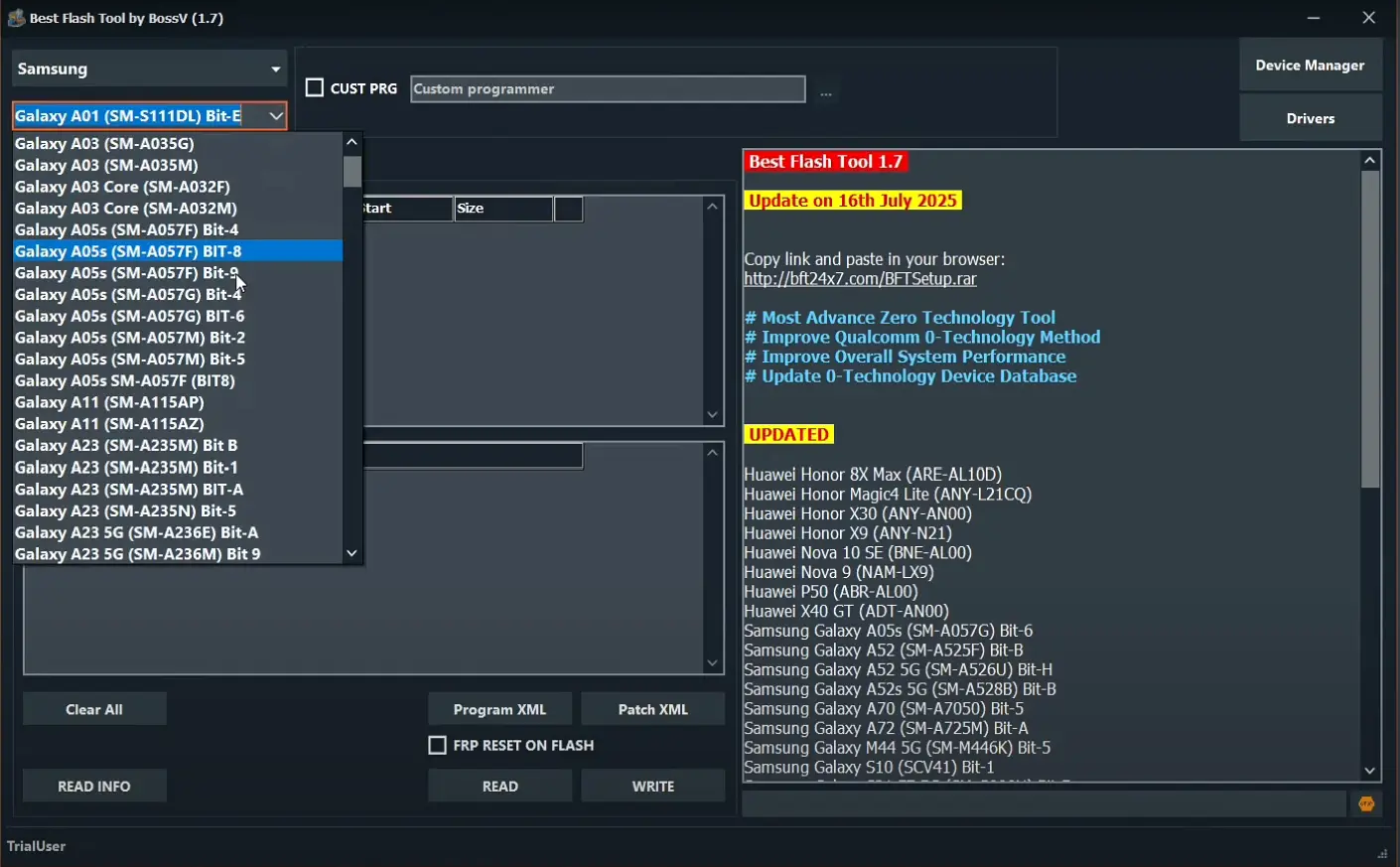
How to Use BFT Flash Tool?
Before starting, create a backup of important data whenever possible. Firmware operations can sometimes erase user data, and using incorrect firmware can cause additional software problems.
Step 1: Prepare Your Computer
- Use a Windows PC with enough free storage and install the USB drivers required for your phone.
Step 2: Download the Correct Firmware
- Find firmware that exactly matches your device model and, where applicable, its region or variant. Do not select firmware simply because it is for the same brand.
Step 3: Run BFT Flash Tool
- Extract the BFT Flash Tool package if it is compressed and launch the program with the required Windows permissions.
Step 4: Connect the Phone
- Power off the device and connect it using the appropriate USB connection mode for its chipset. If the device is not detected, check the drivers, cable, USB port, and device mode.
Step 5: Select the Required Operation
- Choose the appropriate flashing or servicing function and load the required firmware files.
Step 6: Start the Process
- Review the selected files and device information before starting. Do not disconnect the phone or shut down the computer while an active firmware operation is running.
BFT Flash Tool Driver Problems:
One of the most common reasons a Best flashing tool cannot detect a phone is an incorrect or missing driver. MTK, Qualcomm, and Unisoc devices can require different drivers and connection modes.
If BFT does not detect your device, try reinstalling the correct USB driver, changing the USB port or cable, restarting Windows, and reconnecting the phone in the required mode.
Important Safety Tips:
Flashing Android firmware should be performed carefully. Always verify the device model before selecting firmware and keep a backup of important files.
Using incompatible firmware, disconnecting the device during flashing, or selecting the wrong partition can lead to boot failures or other software problems. For professional servicing, use legitimate firmware and tools and only perform security-related operations on devices you are authorized to repair.
BFT Flash Tool System Requirements:
A basic setup generally includes:
- Windows PC
- Windows 7, 8, 10, or 11
- USB cable
- Correct Android USB drivers
- Sufficient free storage
- Compatible firmware package
- Stable USB connection
Why Use BFT Flash Tool?
The main advantage of BFT is that it combines several Android servicing functions into one Windows application. Instead of using a separate program for every basic operation, technicians can use the appropriate BFT module when their device is supported.
Its multi-chipset approach is particularly useful for repair environments where technicians work with different Android brands and hardware platforms.
Final Words:
BFT Flash Tool is a useful Android servicing utility for supported devices, particularly for technicians who work with MTK, Qualcomm, and SPD/Unisoc phones. Its firmware and maintenance functions can help with a range of software-related repair tasks.
However, compatibility should always be checked before performing any operation. Using the correct firmware, drivers, USB connection, and device-specific procedure is essential for a safe flashing process.
FAQs?
What is BFT Flash Tool?
- BFT Flash Tool is a Windows-based Android flashing and servicing utility for supported devices.
Which chipsets does BFT support?
- BFT is commonly associated with MediaTek, Qualcomm, and SPD/Unisoc devices, although exact support depends on the version and device.
Can BFT flash Android firmware?
- Yes, firmware flashing is one of its main purposes on supported devices.
Why is my phone not detected by BFT?
- Missing drivers, an incorrect connection mode, USB problems, or unsupported hardware can prevent detection.
Is BFT compatible with every Android phone?
- No. Compatibility varies by model, chipset, firmware, security level, and BFT version.