Modem META Tool v10.2044.0.02 Free Download [2026]
Modem META Tool v10.2044.0.02 Free Download for Windows [2026]
Modem META Tool is a Windows utility used by mobile technicians to communicate with supported MediaTek-powered devices for modem diagnostics and device servicing. It is commonly associated with tasks involving modem configuration, device identity information, and restoring supported network-related settings.
In this guide, we cover Modem META Tool v10.2044.0.02, including its features, system requirements, installation process, common connection problems, and download safety tips. If you are looking for this particular version, check the file details carefully before installing it on your computer.
What Is Modem META Tool?
Modem META Tool is a device-servicing utility associated with MediaTek chipsets. It communicates with compatible devices through supported META-mode connections and can be used for certain modem-related maintenance tasks.
The tool is intended primarily for technicians and experienced users who understand device firmware, USB drivers, and modem configuration. Compatibility depends on the device model, chipset, firmware, and available database files.
Modem META is not a universal Android repair tool. It should not be confused with firmware flashing utilities designed to reinstall an entire operating system.
Modem META Tool v10.2044.0.02 Features
MediaTek Device Support
The tool is designed for compatible MediaTek-powered smartphones and other supported devices. Actual functionality varies by device and firmware version.
Modem Diagnostics
Technicians can use compatible META-mode tools to communicate with supported modem components and investigate certain network-related problems.
Device Identity Servicing
Modem META is associated with servicing functions involving device identifiers and related information. Any restoration or repair should use the device’s original, legally assigned information and follow applicable local laws.
Serial Number and Address Information
Some versions and supported configurations provide servicing options for serial-number and Bluetooth or Wi-Fi address information. Not every function is available on every device.
USB Driver Compatibility
A compatible MediaTek USB driver may be required for Windows to recognize the device. Incorrect drivers, USB cables, or connection modes can prevent the tool from communicating with a phone.
Windows-Based Interface
The application is intended for Windows computers, allowing technicians to connect compatible devices and work with the available servicing options.
Modem META Tool v10.2044.0.02 Details
| Information | Details |
|---|---|
| Software name | Modem META Tool |
| Version | v10.2044.0.02 |
| Developer attribution | MediaTek Inc. |
| Software category | Mobile device servicing |
| Platform | Windows |
| Chipset support | Compatible MediaTek devices |
| Package format | ZIP archive, depending on source |
| Reported package size | Approximately 88 MB |
| License and availability | Verify the terms and package source |
The package size and version information above are based on third-party download listings and should be checked against the actual file. A third-party listing does not, by itself, establish that a package is an official or verified release.
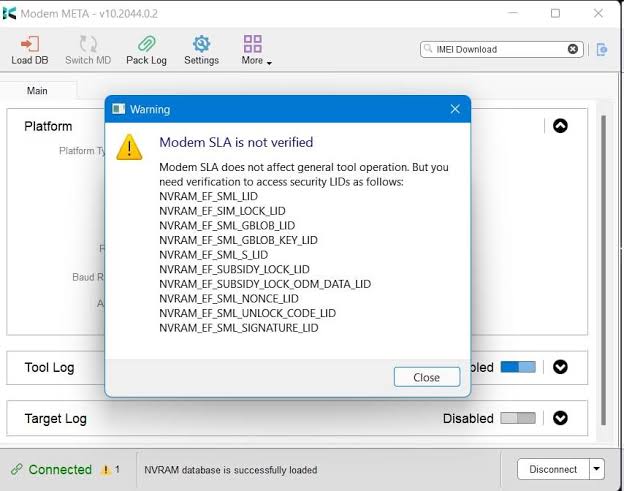
System Requirements:
Before installing Modem META Tool, prepare a Windows computer and check that the required drivers and device files are compatible.
- Operating system: Windows; exact compatibility depends on the package.
- RAM: Sufficient memory to run Windows and the servicing application.
- Storage: Enough free disk space to extract the archive and store required files.
- USB connection: A working USB port and a suitable data cable.
- Drivers: Compatible MediaTek USB drivers, if required.
- Device: A supported MediaTek-powered device.
- Additional files: Compatible firmware database files may be required for certain operations.
These are general preparation requirements, not a guarantee that every version will run on every Windows computer.
How to Download Modem META Tool v10.2044.0.02
Use a reputable source and verify that the archive matches the version named in this article.
- Visit a trusted software archive or a source provided by the device manufacturer or authorized service provider.
- Find the package named
ModemMETA_v10.2044.0.02.zip. - Check the listed version, file size, and available checksum.
- Scan the downloaded archive with updated security software.
- Extract the ZIP file into a new folder.
- Review the included documentation before running any executable.
Download reference: A third-party listing for this version is available on Android File Host. This is an archive listing, not confirmation of an official MediaTek download. Verify the file before use.
How to Install Modem META Tool on Windows
Installation steps can differ depending on whether the downloaded package contains an installer or a portable application.
- Download the version you intend to use.
- Extract the ZIP archive using Windows or a trusted archive utility.
- Read any included README or installation instructions.
- Install only the drivers required by your compatible device.
- Connect the phone using a reliable USB data cable and the connection mode specified in the documentation.
- Open the application according to the package instructions.
- Confirm that the tool recognizes the device before attempting a supported service operation.
- Avoid installing unknown driver packages or disabling Windows security protections just to make a tool run.
Common Modem META Tool Problems and Fixes:
Device Not Detected
Check the USB cable, USB port, device connection mode, and driver installation. A cable that only supports charging may not provide a working data connection.
Driver Installation Error
Download drivers from a trustworthy source, check their Windows compatibility, and remove conflicting driver installations only when you understand the consequences.
META Mode Connection Failed
Confirm that your particular device supports the required connection mode and that you are following the correct model-specific instructions. Not every MediaTek device uses the same procedure.
Required Database Files Missing
Some servicing functions require database files compatible with the device’s firmware. Use the correct files for the exact model and firmware rather than selecting unrelated files.
Application Does Not Open
Extract the entire archive, review any included instructions, and check whether your Windows version is supported. Scan the files for security threats before trying again.
Important Safety and Legal Advice
Modem META Tool can access sensitive device configuration and identity-related functions. Incorrect operations may cause connectivity problems or make a device unusable.
Use the software only on devices you own or are authorized to service. Restore original device identifiers when legally permitted, and never use the tool to assign unauthorized, duplicated, or fabricated identifiers. Laws governing IMEI changes vary by country.
Before servicing a device, back up important information and confirm the exact model and firmware. If you are unfamiliar with modem servicing, seek help from a qualified technician.
Frequently Asked Questions
Is Modem META Tool v10.2044.0.02 free?
Third-party archives list this version for download. Check the software’s licensing terms and the source’s reliability before using it.
Does Modem META Tool support all Android phones?
No. It is designed for supported MediaTek devices, and available functions depend on the device, firmware, drivers, and required files.
Does Modem META Tool work on Windows 11?
Compatibility depends on the particular package and driver support. Check the requirements and test only with a trusted installation.
Is v10.2044.0.02 the latest version in 2026?
It should not be described as the latest without current verification. Third-party version archives list v10.2340.0.05 as a newer release. Check compatibility before choosing a newer version.
Can Modem META Tool flash Android firmware?
It is primarily associated with modem servicing and diagnostics, not general-purpose firmware flashing. Use a suitable, model-compatible firmware tool for firmware installation.
Is it safe to download Modem META Tool?
Safety depends on the source and the integrity of the package. Download from a reputable source, verify checksums where available, scan the archive, and avoid modified executables.
Final Words:
Modem META Tool v10.2044.0.02 is a version that mobile technicians may encounter when working with compatible MediaTek devices. Its supported functions, driver requirements, and connection procedures depend on the particular phone and firmware.
Before downloading, confirm the version and source, review the compatibility requirements, and keep a backup of important data. Choose the appropriate tool for your specific servicing task and use device identity functions only for lawful, authorized restoration.