Nusantara Unlock Tool Crack + Latest Versoin Free Download 2027
Nusantara Unlock Tool Crack Latest Versoin Free Download 2027

Nusantara Unlock Tool is The Bootloader On A Specific Redmi Model Then Immediately Switch To Fixing Imei On An Oppo And Wished One Tool Could Handle Both Without Constant Program Switching? It’s A Genuine Hassle Especially With How Many Individual Xiaomi Codenames Exist Each Needing Its Own Exact Match Rather Than A Generic Script. You Start Looking For Something That Actually Knows The Difference Between A Redmi Note 8 And A Redmi K30 Instead Of Treating Them The Same.
That’s Exactly What Nusantara Unlock Tool Offers And This Post Breaks Down What It Covers. From Qualcomm Edl And Sideload Functions Across Dozens Of Named Xiaomi Models To Mediatek Support For Oppo Vivo Huawei And Meizu We’ll Walk Through Each Section And What It Actually Does. By The End You’ll Know Exactly Which Method Fits Your Specific Device.
When user stuck with Fastboot operations, firmware servicing, and chipset-specific repair tasks can become difficult when you need support for different brands and devices. Nusantara Unlock Tool provides a Windows-based solution for handling supported devices from brands such as Xiaomi, OPPO, Vivo, Huawei, and Meizu. The tool focuses on mobile maintenance and repair tasks.
What is Nusantara Unlock Tool?
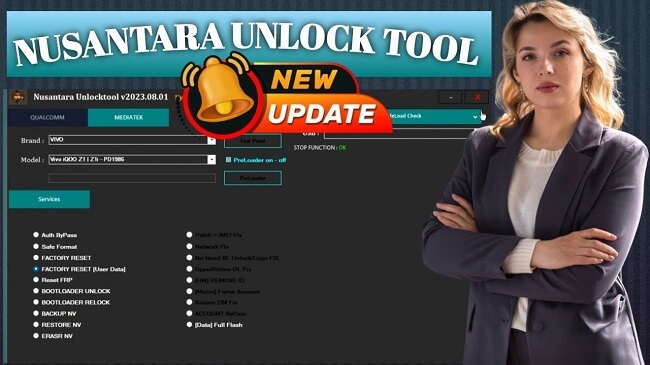
Nusantara Unlock Tool is a Windows-based Android servicing application used for different device maintenance and repair tasks. It is commonly used with MediaTek and Qualcomm devices and can be used for supported Xiaomi firmware and bootloader-related devices. The tool has functions such as IMEI-related servicing, FRP reset, and device unlocking, depending on the supported device and version.
Key Features Of Nusantara Unlock Tool 2027:
FRP Reset
The tool can reset FRP on supported Android phones. It works with different modes depending on the device.
Bootloader Unlock
You can unlock the bootloader on supported Xiaomi phones. It also has Fastboot unlock options for some models.
EDL Flashing
The tool lets you flash supported Qualcomm phones in EDL mode. You can select the partitions you need to flash.
Fastboot Flashing
You can flash supported phones through Fastboot mode. It also includes options for FRP erase and auto-reboot.
Auth Bypass
The MediaTek section includes an Auth Bypass option for supported phones. This can be useful when working with MTK devices.
Factory Reset
You can perform a factory reset on supported Qualcomm and MediaTek devices. The reset options are available in different servicing modes.
NV Backup & Restore
The tool lets you back up NV data before doing repair work. You can also restore the saved NV data when needed.
IMEI & Network Fix
It includes options for fixing IMEI and network-related issues on supported devices. These functions are mainly available for MediaTek phones.
Pros & Cons:
Pros:
- Supports MediaTek and Qualcomm workflows.
- Includes Fastboot and ADB/Sideload functions.
- Provides Qualcomm EDL services.
- Includes NV backup and restore options.
- Supports several Xiaomi-specific workflows.
- Covers multiple Android brands.
Cons:
- Compatibility varies by model and software version.
- Some operations can erase user data.
- Low-level servicing requires technical knowledge.
- Correct drivers and connection modes are important.
- The supplied data does not specify complete hardware requirements.
How To Download, Install & Use Nusantara Unlock Tool?
Download:
- Download the available Nusantara Unlock Tool from Link Below OR a trusted Website.
- Locate the downloaded RAR/ZIP file.
- Extract the archive using WinRAR or 7-Zip.
- Open the extracted folder.
Install:
- Install the required Android USB drivers.
- Open the Nusantara Unlock Tool folder.
- Run the tool executable.
- Allow Windows permissions if requested.
- Connect the supported Android device.
Use:
- Select the appropriate MediaTek, Qualcomm, Fastboot, or ADB/Sideload section.
- Connect the device using the required mode.
- Read or check device information where available.
- Select the required service operation.
- Verify the exact device model and selected function.
- Create a backup before operations that may affect data.
- Start the operation and wait for it to complete.
- Reboot the device after the process finishes.
Tool Setup Download Information
- File Version: v7.0.0
- File Size: 71.11 MB
- 🗝File Password: none❌
- Download Link👇
Conclusion
Nusantara Unlock Tool is a useful Windows software for Android servicing and repair tasks. It supports Qualcomm, MediaTek, Xiaomi, OPPO, Vivo, Huawei, and Meizu devices. Also, It offers FRP reset, bootloader unlock, EDL flashing, Fastboot flashing, and Auth Bypass in one tool. It has a simple interface and is very easy to operate for every kind of user, whether they are a beginner or an expert technician.
FAQ’s
Which chipsets does it support?
The supplied information primarily lists MediaTek and Qualcomm servicing functions.
Which brands are listed?
The supplied information lists Xiaomi, OPPO, Vivo, Huawei, and Meizu, along with additional Xiaomi-specific models and workflows.
Does Nusantara Unlock Tool support EDL?
Yes. The Qualcomm section includes EDL-mode service functions.
Does it support Fastboot?
Yes. The supplied information includes multiple Fastboot checking, unlocking, servicing, and reboot functions.
Does it support NV backup?
Yes. The MediaTek section lists Backup NV and Restore NV.