Prime Tool V9.0 Full Setup Download Latest Version [2027]
Prime Tool V9.0 Full Setup Download Latest Version [2027]
When an Android phone has a software problem or gets stuck during the initial setup after a factory reset, mobile technicians may need specialized servicing tools to diagnose the issue. Prime Tool X V9.0 is a Windows-based utility associated with Android device servicing, particularly for selected Samsung and Xiaomi devices.
In this guide, you will learn about Prime Tool V9.0 Full Setup Download, its main features, supported devices, system requirements, installation process, common connection errors, and important precautions before using the software.
What Is Prime Tool V9.0?
Prime Tool X is a mobile servicing utility designed for Windows computers. It provides functions for working with selected Android devices, with available options depending on the phone model, chipset, Android version, and security patch.
The tool is mainly discussed in connection with Samsung devices and selected Xiaomi or Redmi models. It may be useful for technicians who need to identify a connected phone or perform supported software-maintenance operations.
Prime Tool V9.0 is a version listed by third-party software websites. Because device support can change between releases, users should check the version information and compatibility details before attempting any operation.
Prime Tool V9.0 Features:
Prime Tool X includes several functions associated with Android servicing. The availability of each function depends on the connected device and the software build.
- Device Support: Provides options for selected Samsung and Xiaomi/Redmi devices.
- FRP-Related Functions: Includes functions advertised for Factory Reset Protection servicing on supported devices. Only use these functions on phones you own or are authorized to service.
- MediaTek Support: Provides options associated with MediaTek Preloader and BROM connection modes on compatible hardware.
- Qualcomm Connectivity: Certain releases advertise Qualcomm device connection support, depending on the supported port and device configuration.
- Device Detection: Helps technicians identify whether a compatible phone is connected to the computer.
- Driver Support: Requires appropriate USB and chipset drivers for reliable communication with supported devices.
- Simple Interface: Offers a graphical interface for accessing available device and servicing options.
- Windows Compatibility: Designed for use on a Windows PC rather than as a standalone Android application.
What’s New in Prime Tool V9.0?
Third-party listings describe V9.0 as including improvements related to device compatibility and connectivity. Reported features include:
- Additional Samsung servicing compatibility, including selected newer Android versions.
- Qualcomm QDLoader 9008 connection support in compatible configurations.
- MediaTek Preloader and BROM mode options.
- Support for selected Xiaomi/Redmi models.
- Changes to the interface and device connection workflow.
These features should not be interpreted as universal compatibility. A function may work on one model and fail on another, even when both phones use the same chipset. Check the release notes and test compatibility before using the tool on a customer’s device.
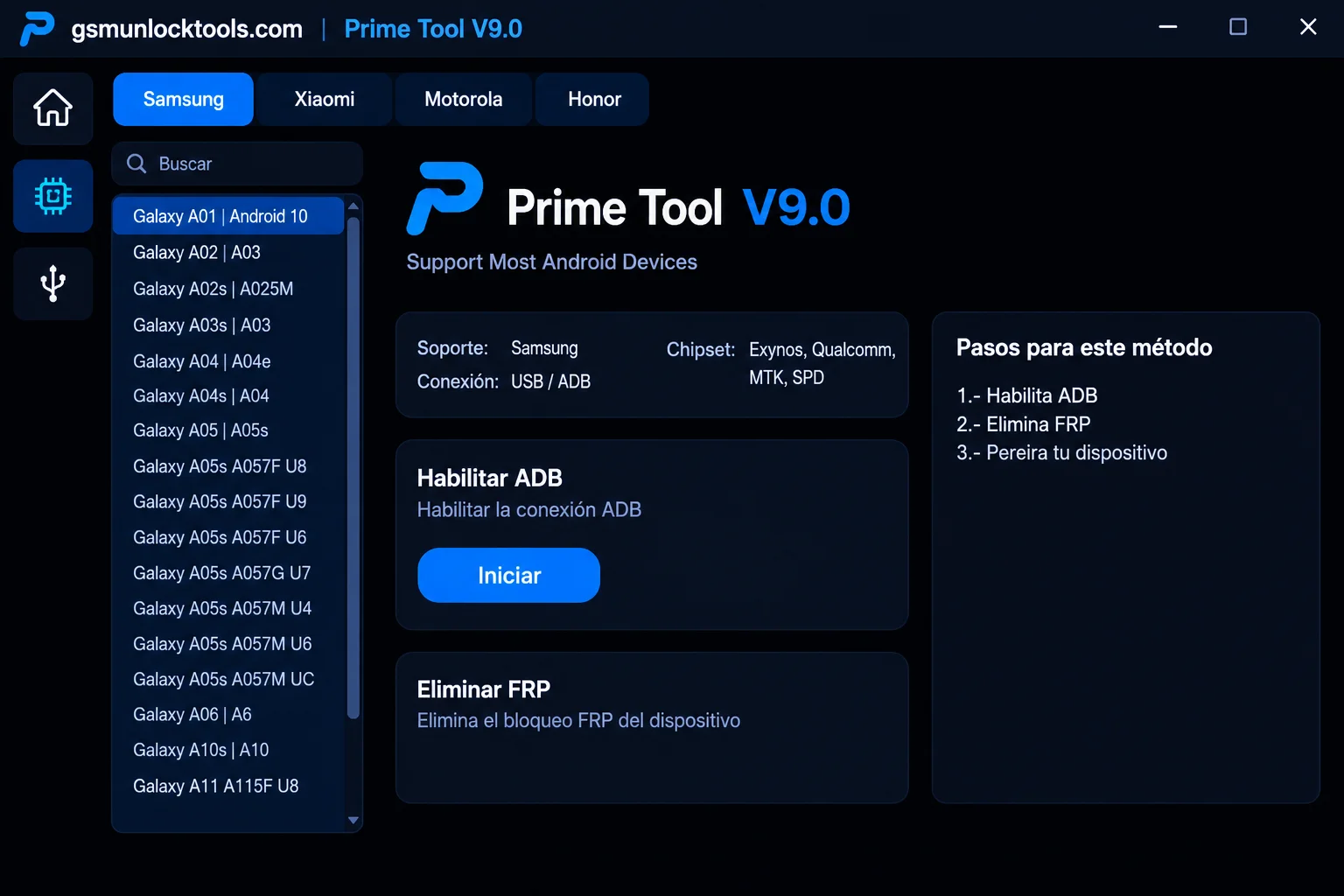
Prime Tool V9.0 Download Details:
Before downloading, review the basic information below.
- Tool Name: Prime Tool X
- Version: V9.0
- Platform: Windows PC
- Category: Mobile Repair / Android Servicing
- Device Support: Selected Samsung and Xiaomi/Redmi devices
- Connection: USB cable and compatible drivers
- License: Confirm the terms supplied with your copy
- Download Source: Use a source you can verify and trust
Download note: I could not verify a developer-operated official download for this specific build. Avoid describing an unverified third-party file as an official or guaranteed-safe download. Scan downloaded files with reputable security software before running them.
Prime Tool V9.0 System Requirements:
The exact requirements can depend on the package and its included drivers. A practical starting point for a Windows servicing PC is:
- Operating System: Windows 10 or Windows 11
- Processor: Compatible Intel or AMD processor
- RAM: 4 GB or more recommended
- Storage: Sufficient free disk space for the program and temporary files
- USB Connection: A working USB port and reliable data cable
- Drivers: Compatible USB or chipset drivers
- Administrator Access: May be required to install drivers or launch certain functions
These are general recommendations, not independently verified minimum specifications for every Prime Tool V9.0 package.
How to Install Prime Tool V9.0 on Windows?
Follow these general installation steps before connecting a device.
Step 1: Download the Setup
Obtain the package from a trustworthy source. Check the file name, version, archive contents, and publisher information where available. Do not run an executable if its source is unclear or your security software identifies a threat.
Step 2: Extract the Files
If the download is a ZIP or RAR archive, use a reputable archive utility to extract it into a new folder. Avoid running files directly from an archive.
Step 3: Check the Drivers
Install only the USB or chipset drivers required for your device and obtained from a trustworthy source. Restart Windows if the driver installer requests it.
Step 4: Open the Application
Locate the main program file in the extracted folder. Check its digital signature and security scan results before opening it. Use administrator permissions only when necessary and when you trust the software.
Step 5: Connect a Compatible Device
Use a good-quality USB cable and a working computer port. Make sure the phone has sufficient battery power and that you have permission to service it.
Step 6: Check Device Detection
Open the relevant device or connection section and check whether the software recognizes the phone. If it does not, review the driver status and connection requirements before proceeding.
Step 7: Verify the Operation
Confirm the exact model, software version, and intended function before making changes. Back up important data whenever possible, and never interrupt a firmware operation once it has started.
How to Use Prime Tool V9.0?
The available workflow depends on the connected phone and the specific function being used. For legitimate device maintenance, follow these general guidelines:
- Identify the exact phone model and chipset.
- Check that the software version supports the device.
- Install the required drivers from a trusted source.
- Connect the phone using a reliable USB cable.
- Confirm that Windows detects the device correctly.
- Read any warnings displayed by the application.
- Select only a function that is appropriate for the device and your authorization.
- Back up important information before operations that may erase data.
- Wait for the process to finish before disconnecting the phone.
- Confirm that the phone starts and functions normally afterward.
Do not attempt to remove account protection from a device you do not own or have explicit permission to service. If a phone belongs to you and requests a previously synchronized Google account after a reset, use Google’s official account-recovery process or contact the device manufacturer with proof of ownership.
Prime Tool V9.0 Driver Problems:
Driver issues are a common reason that mobile servicing software fails to recognize a connected phone.
- Check the USB cable and try another working port.
- Avoid USB hubs when troubleshooting.
- Open Windows Device Manager and check for driver warnings.
- Confirm that the phone is using the required connection mode.
- Install the correct driver for the device’s chipset.
Driver Installation Fails:
- Restart Windows and run the trusted driver installer again.
- Check whether an older driver is conflicting with the new one.
- Make sure the installer supports your Windows version.
- Avoid unofficial driver bundles that contain unrelated applications.
Qualcomm Device Does Not Connect
Check whether the device and the selected function support the required Qualcomm connection mode. A particular port appearing in Device Manager does not guarantee that every operation will be compatible.
MediaTek Device Is Not Recognized
Verify that the correct MediaTek driver is installed and that the phone is connected in the mode required for the intended operation. Different models can use different connection procedures.
Common Prime Tool V9.0 Errors:
Application Does Not Open
Check whether Windows has blocked the file, whether the archive was extracted completely, and whether the software is compatible with your system. Do not disable security protection simply to force an unknown executable to run.
Unsupported Device Error
This message may mean the selected model, chipset, Android version, or security patch is not supported by that build. Check the release information instead of repeatedly attempting the same operation.
USB Connection Error
Try another data cable and USB port, then inspect Device Manager for driver problems. A charging-only cable may not provide a data connection.
Operation Fails
Stop and review the error message. Confirm the device model and relevant software details before trying again. Repeated attempts with incompatible files can cause additional problems.
Safety Tips Before Using Prime Tool V9.0:
Mobile servicing software can make changes that affect personal data or the phone’s ability to start. Keep these precautions in mind:
- Back up important files before maintenance.
- Verify the exact device model and variant.
- Use trusted software and drivers.
- Scan downloaded files before running them.
- Avoid modified or pre-activated packages from unknown sources.
- Do not interrupt an active firmware operation.
- Do not use account-related functions on devices without authorization.
- Keep a record of the original device and software details.
- Use official recovery or support channels if account verification is required.
Final Words:
Prime Tool V9.0 is associated with Android servicing functions for selected Samsung and Xiaomi/Redmi devices. Its advertised capabilities include device connectivity and chipset-related options, but actual compatibility depends on the phone, Android version, security patch, and software build.
Before downloading Prime Tool V9.0 Full Setup, verify the source and scan the package for security risks. Install the appropriate drivers, check device compatibility, and back up important data before making changes.
For account-verification problems on your own phone, the manufacturer’s support service or the official Google account-recovery process is the safest starting point.
Frequently Asked Questions
What is Prime Tool V9.0?
Prime Tool X V9.0 is a Windows utility advertised for selected Android device-servicing tasks. Its available functions depend on the device and software version.
Is Prime Tool V9.0 available for Windows?
Third-party listings describe it as Windows software. Check the specific package requirements before installing it.
Which phones does Prime Tool V9.0 support?
Listings mention selected Samsung and Xiaomi/Redmi devices. Do not assume that every model or Android version is supported.
Does Prime Tool V9.0 support MediaTek devices?
Some listings describe MediaTek Preloader and BROM-related functions. Compatibility depends on the phone model, chipset, and tool build.
Why is Prime Tool V9.0 not detecting my phone?
Common causes include missing drivers, a faulty USB cable, an incorrect connection mode, or an unsupported device. Check Device Manager and the software’s compatibility information.
Is Prime Tool V9.0 safe to download?
Safety depends on the source and the specific file. Prefer a verifiable developer source, scan the package, and avoid unknown executables or modified releases.
Can Prime Tool V9.0 fix every Android phone?
No. Mobile servicing tools have compatibility limits. A feature that works with one model may not work with another.
What should I do if my phone asks for a Google account after a reset?
Use the Google account previously synchronized with the phone or Google’s official account-recovery process. If you purchased the phone second-hand, contact the previous owner or the manufacturer with proof of ownership.