SamFw FRP Tool v6.0.1 Best Download Guide [2027]
SamFw FRP Tool v6.0.1 Best Download Guide [2027]

If you work with Samsung phones, you have probably heard of SamFw Tool. It has become a useful Windows utility for mobile technicians because it puts several Samsung servicing functions into one program.
The latest version covered in this guide is SamFw Tool v6.0.1. The official SamFW release information lists improvements such as additional Qualcomm firehose loaders, optimized Exynos FRP handling, IMEI2 and security patch information, and basic Apple device support.
What Is SamFw FRP Tool?
SamFw Tool is a Windows-based mobile servicing program developed for technicians and advanced users. Although the name is strongly associated with Samsung FRP servicing, the software includes several other device-management and repair functions.
The tool supports different connection methods, including MTP, ADB, Download Mode, EDL, and other supported servicing modes. Available functions depend on the phone model, chipset, Android version, and security level.
SamFW also maintains its own website and firmware platform, which makes it easier to distinguish the original tool from the many third-party download pages found online.
SamFw Tool v6.0.1 Features:
- The v6.0.1 release includes several changes aimed at improving device servicing.
Samsung FRP Functions
- SamFw Tool provides FRP-related functions for supported Samsung devices. The exact availability depends on the model and security patch.
- The official release notes also mention optimized Exynos FRP handling and support for newer security levels.
Read Device Information
- The tool can read useful information from supported devices. This can include details such as the device model, IMEI information, and security patch level.
- The v6.0.1 update specifically adds support for reading IMEI2 and patch-level information in supported workflows.
CSC Operations
- SamFw Tool includes CSC-related functions for supported Samsung devices. Technicians can use these options when performing authorized software maintenance or configuration work.
Factory Reset
- Factory reset options are available for supported devices and connection modes. A reset can erase personal data, so important files should always be backed up whenever possible.
Download Mode Functions
- The software includes several Download Mode utilities for supported Samsung phones. These can be useful when diagnosing certain software problems or working with official firmware.
EDL and Qualcomm Functions
- SamFw Tool also includes EDL-related functions for supported Qualcomm devices. The available operations can include information reading, factory reset, FRP reset, and partition management.
What’s New in SamFw Tool v6.0.1?
- According to the official SamFW release information, version 6.0.1 brings several notable changes.
- The update adds 12 firehose loaders, improves Exynos FRP handling, adds IMEI2 and security patch information, and introduces basic Apple device support.
- These changes make the new version more useful for technicians who work with a variety of supported devices.
SamFw FRP Tool v6.0.1 Download:
- For the safest download, use the original SamFW website rather than random third-party download pages.
- The official SamFW release page lists the v6.0.1 package as:
- SamFwToolSetup_v6.0.1.zip
- It also publishes the MD5 hash for the package, which can be used to verify that the downloaded file matches the official release.
- The official site currently provides the direct ZIP at the
samfw Tooldomain.
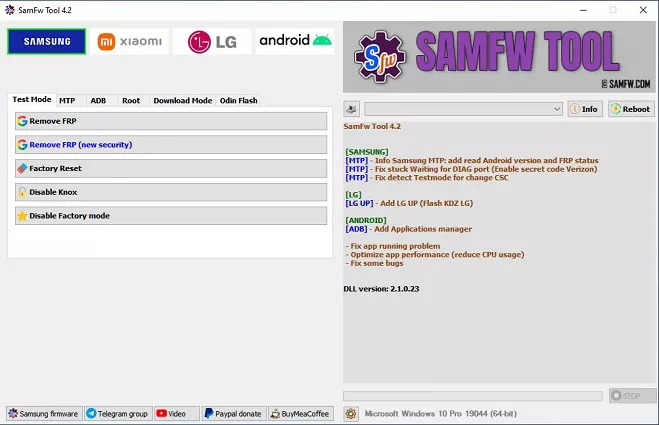
How to Install SamFw Tool v6.0.1
- Installing the SamFW tool is fairly straightforward.
- First, download the official ZIP package and extract it to a folder on your Windows computer.
- Next, install the required Samsung or Android USB drivers. These drivers allow Windows and SamFw Tool to communicate correctly with the connected phone.
- After the drivers are installed, open the SamFw Tool application and connect your supported device using a reliable USB data cable.
- If Windows does not detect the phone, check Device Manager and make sure there are no driver errors.
Basic Things to Check Before Using the Tool
- Before starting any servicing operation, identify the exact model of the phone.
- Different variants of the same Samsung series can use different chipsets, firmware packages, or security configurations. Selecting the wrong option can result in errors or unexpected behavior.
- It is also a good idea to keep the phone sufficiently charged and avoid disconnecting the USB cable while an active operation is running.
SamFw Tool Driver Problems
A missing USB driver is one of the most common reasons the tool fails to detect a phone.
If your device is not showing up, try the following:
- Reinstall the correct Samsung USB driver.
- Try another USB cable.
- Use a different USB port.
- Restart the computer.
- Restart the phone.
- Check Windows Device Manager.
- Make sure the phone is connected in the correct mode.
If the problem continues, the particular model or security version may not be supported by the selected function.
Is SamFw Tool Safe?
Download SamFw Tool from the official SamFW website whenever possible. There are many websites offering modified or repacked versions of popular phone servicing tools.
The official SamFW page also notes that the application uses tools, scripts, and obfuscation, which can cause some antivirus programs to produce false-positive warnings. SamFW publishes the MD5 hashes of its official files so users can verify the download.
For additional safety, avoid disabling Windows security permanently just to install a tool. If an antivirus warning appears, verify the file’s source and hash before making a decision.
System Requirements:
- SamFw Tool is designed for Windows PCs.
- For a comfortable experience, a reasonably modern Windows computer with working USB ports and enough free storage should be sufficient.
- You will also need the appropriate USB drivers for the device you are servicing.
Final Thoughts:
SamFw FRP Tool v6.0.1 is more than a basic FRP utility. It combines a number of Samsung and Android servicing functions in one Windows application, making it useful for technicians who regularly work with supported smartphones.
The safest approach is to download the program directly from SamFW, verify the package when necessary, install the correct drivers, and check device compatibility before starting any operation.
Remember that FRP is an Android security feature. Any FRP or account-related servicing should only be performed on a device that you own or have explicit permission to repair.
Frequently Asked Questions?
What is SamFw FRP Tool v6.0.1?
- SamFw Tool v6.0.1 is a Windows-based mobile servicing utility with Samsung FRP, device information, CSC, reset, Download Mode, EDL, and other supported functions.
Where can I download SamFw Tool v6.0.1?
- The safest option is the official SamFW website, which publishes the v6.0.1 ZIP package and its MD5 hash.
Does SamFw Tool support every Samsung phone?
- No. Functions depend on the exact model, Android version, chipset, security patch, and supported servicing method.
Why is my Samsung phone not detected?
- Check the USB cable, USB port, Samsung USB drivers, and the connection mode required by the selected operation.
Is SamFw Tool free?
- The basic SamFw Tool download is provided by SamFW, although some newer or online servicing functions may require credits. The current SamFW service page lists paid FRP services separately.